This post has not been translated to English yet. Showing the original text.
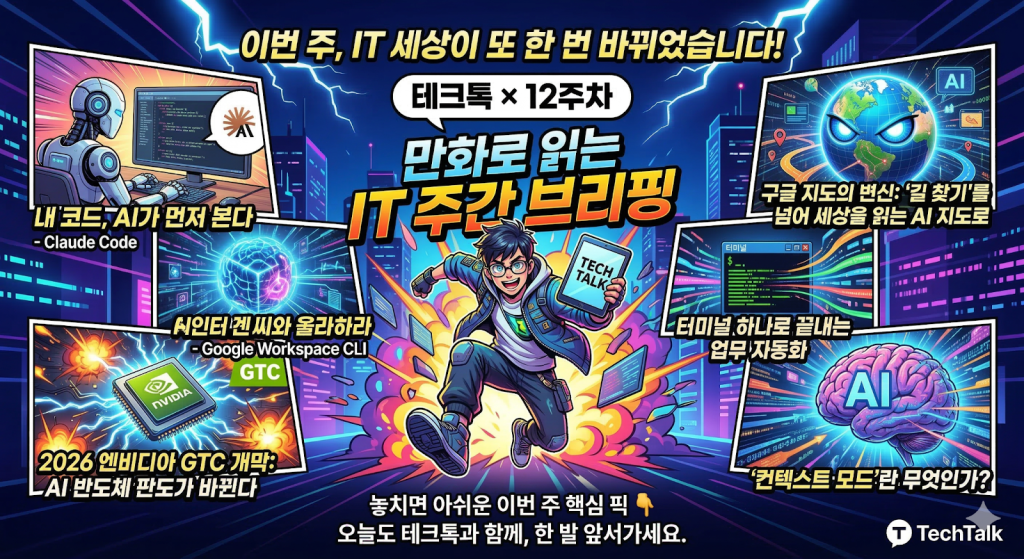
Tech Tok – Summary In a Cartoon
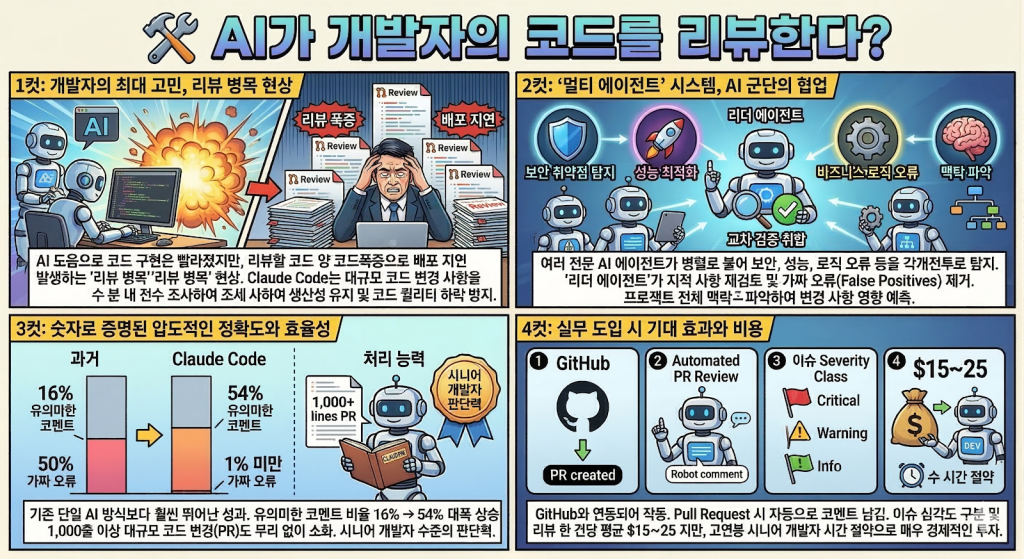
AI가 개발자의 코드를 리뷰한다? Claude Code 코드 리뷰 기능”
안녕하세요, 테크톡 독자 여러분!
최근 개발 생태계에서 가장 뜨거운 화두는 ‘AI가 얼마나 코드를 잘 짜는가’를 넘어, ‘AI가 짠 코드를 누가, 어떻게 검증하는가’로 옮겨가고 있습니다. 앤트로픽(Anthropic)은 이 질문에 대한 답으로 Claude Code의 ‘코드 리뷰’ 기능을 정식 공개했습니다.
단순한 문법 체크를 넘어, 마치 숙련된 시니어 개발자가 옆에서 조언해 주는 듯한 이 기능의 핵심을 4가지 포인트로 짚어보겠습니다.
1. 개발자의 최대 고민: ‘리뷰 병목 현상’의 해결
최근 개발자들은 AI의 도움으로 이전보다 훨씬 빠르게 기능을 구현합니다. 하지만 역설적으로 리뷰해야 할 코드의 양이 폭증하면서, 실제 배포까지 걸리는 시간은 오히려 늘어나는 ‘리뷰 병목’ 현상이 발생하고 있습니다.
Claude Code의 리뷰 기능은 사람이 일일이 대조하기 힘든 대규모 코드 변경 사항을 수 분 내에 전수 조사합니다. 이는 개발팀의 생산성을 유지하면서도 코드 퀄리티가 하락하는 것을 막는 강력한 방어선이 됩니다.
2. ‘멀티 에이전트’ 시스템: AI 군단의 협업
이 기능이 기존 AI 도구와 차별화되는 지점은 ‘멀티 에이전트(Multi-agent)’ 방식입니다. 하나의 AI가 한 번에 훑고 마는 것이 아니라, 여러 명의 전문 AI가 팀을 이뤄 움직입니다.
분산 분석(Distributed Analysis): 여러 에이전트가 병렬로 붙어 보안 취약점, 성능 최적화, 비즈니스 로직 오류 등을 각개전투로 찾아냅니다.
교차 검증(Cross-Verification): ‘리더 에이전트’가 다른 에이전트들의 지적 사항을 재검토합니다. 이 과정에서 “이건 실제로 문제없는데?” 싶은 가짜 오류(False Positives)를 걸러내어, 개발자가 불필요한 알람에 시달리지 않게 합니다.
맥락 파악: 단순히 코드 한 줄만 보는 게 아니라 프로젝트 전체의 맥락을 읽어, 변경 사항이 다른 모듈에 미칠 영향까지 예측합니다.
3. 숫자로 증명된 압도적인 정확도와 효율성
앤트로픽이 공개한 테스트 결과에 따르면, 새로운 Claude Code 리뷰 기능은 기존의 단일 AI 방식보다 훨씬 뛰어난 성과를 보여줍니다.
과거에는 AI가 남긴 코멘트 중 실제로 수정이 필요한 유의미한 내용이 16% 수준에 불과했지만, 이번 기능을 통해서는 그 비율이 54%까지 대폭 상승했습니다. 절반 이상의 조언이 개발자에게 실질적인 도움이 된다는 뜻입니다.
또한, AI가 잘못된 지적을 하는 ‘오탐률’은 1% 미만으로 낮아졌습니다. 처리 능력 또한 비약적으로 발전하여, 사람이 읽기 벅찬 1,000줄 이상의 대규모 코드 변경(PR)도 무리 없이 소화해 냅니다. 이는 단순한 자동화를 넘어 시니어 개발자의 판단력에 가까워졌음을 의미합니다.
4. 실무 도입 시 기대 효과와 비용
현재 이 기능은 GitHub와 연동되어 작동하며, 다음과 같은 편의성을 제공합니다.
PR 자동 리뷰: GitHub에 Pull Request를 올리면 Claude가 자동으로 등판해 코멘트를 남깁니다.
심각도 구분: 이슈의 경중에 따라 등급을 매겨주어, 개발자가 무엇부터 수정해야 할지 우선순위를 정해줍니다.
비용 효율성: 리뷰 한 건당 평균 $15~$25 정도의 비용이 발생하지만, 고연봉 시니어 개발자의 시간을 수 시간 아껴준다는 점을 고려하면 매우 경제적인 투자라고 볼 수 있습니다.
“
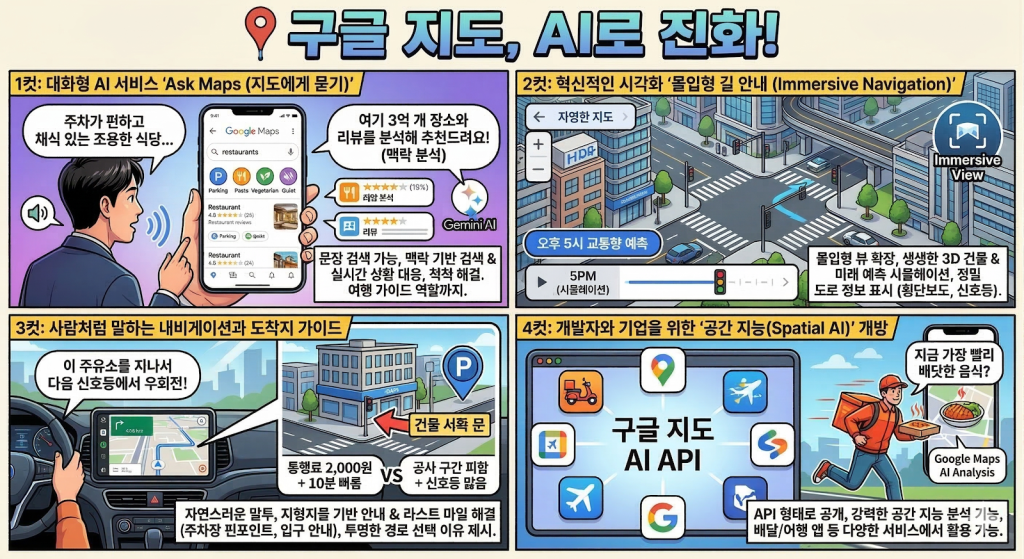
구글 지도, “길 찾기”를 넘어 세상을 해석하는 AI 지도로 변신 “
안녕하세요, 테크톡 독자 여러분!
구글이 자사의 생성형 AI인 제미나이(Gemini)를 구글 지도에 전격 이식하며, 서비스 출시 이후 가장 파격적인 변화를 선보였습니다. 이제 구글 지도는 단순한 내비게이션을 넘어, 사용자의 복잡한 의도를 파악하고 최적의 의사결정을 돕는 ‘인공지능 공간 비서’로 진화했습니다.
이번 2026년 대규모 업데이트의 핵심 포인트 4가지를 심층 분석해 드립니다.
1. 대화형 AI 서비스: “Ask Maps (지도에게 묻기)”
기존의 지도 검색이 ‘장소 이름’이나 ‘카테고리’ 위주였다면, 이제는 문장 형태의 복잡한 질문이 가능해졌습니다. 제미나이는 전 세계 3억 개 이상의 장소 데이터와 수억 개의 리뷰를 실시간으로 분석해 답을 내놓습니다.
맥락 기반 검색: “친구들과 저녁을 먹어야 하는데, 주차가 편하고 채식 메뉴가 있는 조용한 식당을 추천해 줘”라고 물으면, 단순히 식당 리스트를 주는 것이 아니라 각 식당의 리뷰를 분석해 왜 이 장소를 추천하는지 이유까지 설명합니다.
실시간 상황 대응: “비가 오는데 아이들과 실내에서 놀 수 있는 곳이 어디야?” 혹은 “지금 바로 가서 1시간 내로 업무를 볼 수 있는 콘센트 많은 카페를 찾아줘”와 같은 까다로운 요구사항도 척척 해결합니다.
여행 가이드 역할: 특정 지역을 여행할 때 “3일 동안의 도보 여행 코스를 짜줘”라고 요청하면 동선과 함께 방문하기 좋은 시간대까지 고려한 맞춤형 일정을 제안합니다.
2. 혁신적인 시각화: “몰입형 길 안내 (Immersive Navigation)”
이번 업데이트에서 가장 시각적으로 놀라운 부분은 ‘몰입형 뷰(Immersive View)’의 확장입니다. 제미나이 AI가 수십억 장의 스트리트 뷰와 항공 사진을 정밀하게 합성하여 실제 세계를 디지털로 완벽하게 복제해 냅니다.
생생한 3D 경험: 건물, 고가도로, 나무 한 그루까지 3D로 구현되어, 처음 가는 길도 마치 이전에 와본 것 같은 익숙함을 줍니다.
미래 예측 기술: “오늘 오후 5시경 이 도로는 얼마나 붐빌까?”라고 설정하면, AI가 과거 데이터를 바탕으로 해당 시간대의 교통량과 기상 상태를 시뮬레이션하여 시각적으로 보여줍니다.
정밀 도로 정보: 차선 정보는 기본이고 횡단보도, 신호등, 정지 표지판의 정확한 위치까지 화면에 표시되어 복잡한 교차로나 분기점에서도 당황하지 않고 안전하게 주행할 수 있습니다.
3. 사람처럼 말하는 내비게이션과 도착지 가이드
기존의 딱딱한 안내 음성도 완전히 달라졌습니다. 훨씬 자연스러운 말투로 정보를 제공하며 사용자와 소통합니다.
직관적인 안내: “500m 앞 우회전” 대신 “이 주유소를 지나서 다음 신호등에서 오른쪽으로 꺾으세요”와 같이 실제 사람이 길을 알려주는 듯한 지형지물 기반 안내를 제공합니다.
도착지의 ‘라스트 마일’ 해결: 목적지에 다다르면 건물 입구와 가장 가까운 주차장 위치를 핀 포인트로 찍어줍니다. 또한, “주차 후 건물 서쪽 문으로 들어가는 것이 가장 빠릅니다”와 같은 상세 가이드까지 곁들입니다.
투명한 경로 제안: 대체 경로를 제시할 때 단순히 시간 차이만 말하는 게 아니라, “통행료는 2,000원이지만 10분 더 빠른 길” 혹은 “공사 구간을 피하지만 신호등이 많은 길”처럼 선택의 이유를 명확히 제시합니다.
4. 개발자와 기업을 위한 ‘공간 지능(Spatial AI)’ 개방
구글은 이번 AI 기능을 개발자들에게도 API 형태로 공개했습니다. 이를 통해 앞으로 우리가 사용하는 배달 앱, 여행 예약 앱 등에서도 구글 지도의 강력한 AI 분석 기능을 만나볼 수 있게 됩니다. 예를 들어, 배달 앱에서 “지금 가장 빨리 배달되는 따뜻한 음식이 뭐야?”라고 물으면 지도 데이터와 매장 상황을 결합한 답변을 듣게 될 것입니다.
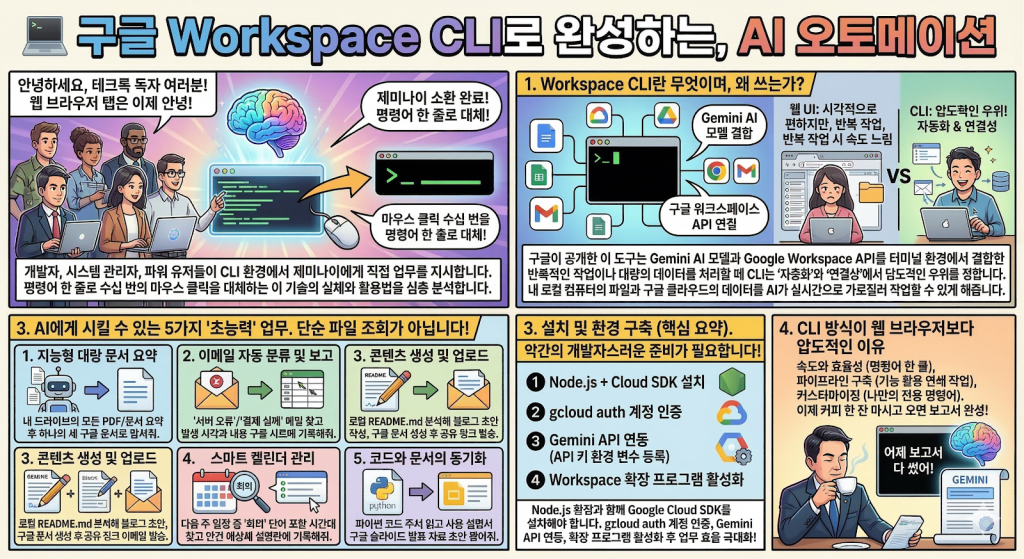
터미널에서 제미나이 소환! 구글 Workspace CLI로 완성하는, AI 오토메이션”
안녕하세요, 테크톡 독자 여러분!
구글 워크스페이스(Docs, Sheets, Drive, Gmail)를 단순히 웹 브라우저 탭에서만 쓰던 시대는 지났습니다. 이제 개발자와 시스템 관리자, 그리고 생산성에 목마른 파워 유저들은 CLI(Command Line Interface) 환경에서 인공지능 제미나이(Gemini)에게 직접 업무를 지시하기 시작했습니다.
마우스 클릭 수십 번을 명령어 한 줄로 대체하는 이 혁신적인 기술의 실체와 활용법을 심층 분석합니다.
1. Workspace CLI란 무엇이며, 왜 쓰는가?
구글이 공개한 이 도구는 Gemini AI 모델과 Google Workspace API를 터미널 환경에서 결합한 강력한 인터페이스입니다.
웹 UI는 시각적으로 편하지만, 반복적인 작업이나 대량의 데이터를 처리할 때는 속도가 느리고 번거롭습니다. 반면 CLI는 ‘자동화’와 ‘연결성’에서 압도적인 우위를 점합니다. 내 로컬 컴퓨터의 파일과 구글 클라우드의 데이터를 AI가 실시간으로 가로질러 작업할 수 있게 해주기 때문입니다.
2. AI에게 시킬 수 있는 5가지 ‘초능력’ 업무
단순한 파일 리스트 조회가 아닙니다. 제미나이의 추론 능력을 빌려 다음과 같은 복잡한 일을 시킬 수 있습니다.
지능형 대량 문서 요약: “내 드라이브 ‘2026_Project’ 폴더에 있는 모든 PDF 파일과 구글 문서를 읽고, 각 파일의 핵심 결론만 추출해서 하나의 새로운 구글 문서로 합쳐줘.”
이메일 자동 분류 및 보고: “지난 24시간 동안 받은 이메일 중 ‘서버 오류’나 ‘결제 실패’ 키워드가 포함된 메일을 찾아서, 발생 시각과 내용을 요약해 구글 시트 1번 행부터 기록해 줘.”
콘텐츠 생성 및 업로드: “현재 내 로컬 경로에 있는 README.md 파일을 분석해서 블로그 포스팅 초안을 작성한 뒤, 구글 문서로 생성하고 팀원들에게 공유 링크를 이메일로 보내.”
스마트 캘린더 관리: “다음 주 일정 중에서 ‘회의’라는 단어가 들어간 모든 시간대를 찾고, 각 회의의 안건을 예상해서 캘린더 설명란에 미리 적어줘.”
코드와 문서의 동기화: “작성 중인 파이썬 코드의 주석을 읽고, 이 기능의 사용 설명서를 구글 슬라이드로 만들어 발표 자료 초안을 뽑아줘.”
3. 설치 및 환경 구축 (핵심 요약)
이 기능을 사용하려면 약간의 ‘개발자스러운’ 준비가 필요합니다. 하지만 한 번 설정하면 업무 시간이 절반으로 줄어듭니다.
필수 도구 설치: Node.js 환경과 함께 Google Cloud SDK를 설치해야 합니다.
프로젝트 인증: gcloud auth application-default login과 같은 명령어를 통해 내 구글 계정과 터미널을 안전하게 연결(OAuth 2.0)합니다.
Gemini API 연동: 구글 AI 스튜디오에서 발급받은 API 키를 환경 변수로 등록하여, CLI가 제미나이의 뇌를 빌려 쓸 수 있게 합니다.
확장 프로그램 활성화: 구글 워크스페이스 확장 기능을 활성화하여 AI가 지메일이나 드라이브에 접근할 수 있는 통로를 열어줍니다.
4. CLI 방식이 웹 브라우저보다 압도적인 이유
속도와 효율성: 수십 개의 탭을 오갈 필요가 없습니다. 명령어 한 줄이면 AI가 백그라운드에서 모든 API 호출을 처리합니다.
파이프라인 구축: 리눅스나 맥의 파이프(|) 기능을 활용해 다른 프로그램의 결과물을 즉시 구글 문서로 보내는 등의 연쇄 작업을 설계할 수 있습니다.
커스터마이징: 나만의 전용 명령어를 만들 수 있습니다. 예를 들어 work-report라는 명령어를 입력하면 자동으로 어제 이메일과 문서를 요약해 보고서를 쓰게 할 수 있습니다.
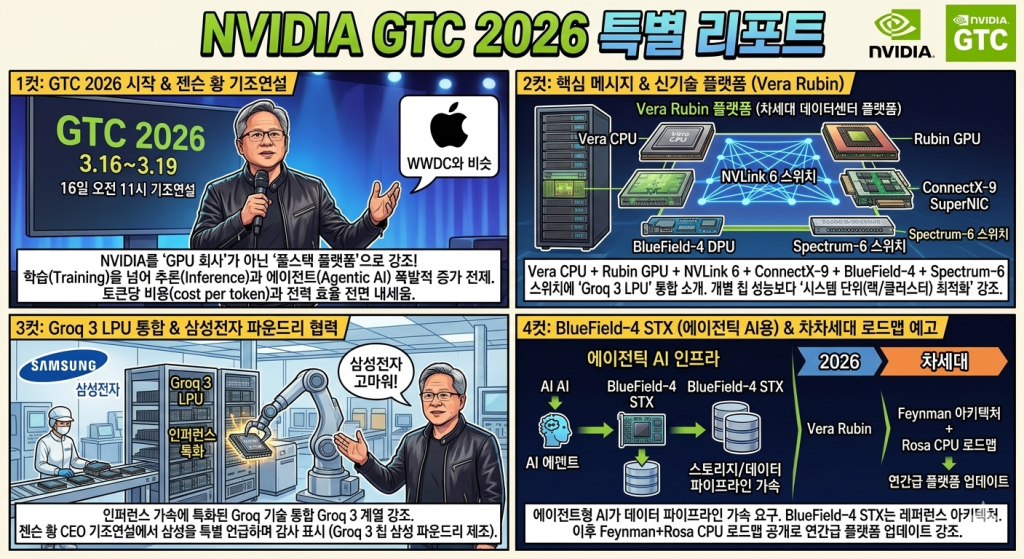
시작된 2026 엔비디아 GTC
엔비디아 GTC는 매년 열리는 개발자, 기술 컨퍼런스인 GPU Technology Conference로 애플의 WWDC와 비슷한 행사입니다. 2026년에는 3월 16일부터 3월 19일까지 진행되며 현지 시간으로 16일 오전 11시부터 엔비디아 CEO인 젠슨황의 연설이 있다고 합니다.
GTC 2026 핵심 메세지, 신기술
젠슨 황은 이번 GTC에서 NVIDIA를 단순 “GPU 회사”가 아니라 AI 팩토리를 구성하는 ‘풀스택 플랫폼‘으로 강조했습니다. 특히 앞으로의 AI 확산은 학습(Training)만이 아니라 추(Inference)와 에이전트(Agentic AI)가 폭발적으로 늘어난다는 전제에서, 토큰당 비용(cost per token)과 전력 효율을 전면에 내세웠습니다
1. Vera Rubin 플랫폼(차세대 데이터센터 플랫폼)
NVIDIA는 차세대 플랫폼 Vera Rubin을 공식 발표했습니다. 구성은 Vera CPU + Rubin GPU + NVLink 6 Switch + ConnectX-9 SuperNIC + BlueField-4 DPU + Spectrum-6 스위치에 더해, Groq 3 LPU가 통합되는 형태로 소개됐습니다. “개별 칩 성능”보다 시스템 단위(랙/클러스터) 최적화를 강조했습니다.
2. Groq 3 LPU 통합(인퍼런스 특화)
키노트/보도에서는 Groq 기술을 통합한 Groq 3 계열(인퍼런스 가속)을 강조했고, 삼성 파운드리 생산 언급도 함께 나왔습니다(출하 시점은 2026년 하반기 언급).
3. BlueField-4 STX(에이전틱 AI용 스토리지/데이터 경로)
에이전트형 AI가 길어진 컨텍스트와 데이터 접근을 요구하면서, 스토리지/데이터 파이프라인 가속도 전면에 올라왔습니다. BlueField-4 STX는 이런 “에이전틱 AI 인프라”를 겨냥한 레퍼런스 아키텍처로 소개됩니다.
(4) 로드맵: Feynman + Rosa CPU(차차세대 예고)
Vera Rubin 이후로는 Feynman 아키텍처와 Rosa CPU까지 로드맵을 공개하며 “연간급 플랫폼 업데이트” 메시지를 강화했습니다.
엔비디아, 삼성전자 고마워
젠슨 황 엔비디아 CEO가 개발자 회의 기조연설에서 삼성을 특별히 언급하며 감사 인사를 표했습니다. 앞서 소개한 Groq 3 LPU 칩을 제조하고 있으며 LPU 칩 제조를 위해 삼성이 최대한 빠르게 생산을 늘리고 있다며 감사의 인사를 전했습니다. 이 발언으로 인해 삼성전자의 파운드리 사업부가 엔비디아가 긴밀한 관계를 유지하고 있음을 알고 있습니다.
삼성전자가 이날 새로운 제품인 HBM4E(7세대)를 공개했는데 이는 HBM(High Bandwidth Memory) 고대역폭 메모리의 종류이며 기존 HBM4(6세대)에서 한 단계 진화한 버전입니다. HBM4E는 전작인 HBM4보다 약 21%의 대역폭이 올라간 성능이며 AI 가속기 성능을 끝까지 끌어올리기 위한 차세대 HBM입니다. 이는 토큰당 비용 절감, 전력당 처리량 개선, 랙당 성능 향상을 뒷받침하는 ‘핵심 부품’으로 자리 잡을 가능성이 크며 엔비디아와 삼성전자의 협력 관계가 더욱 커질 것으로 보고 있습니다.
또한 메모리 부분 반도체에서 탑으로 자리잡고 있는 SK하이닉스도 행사에 참여하였으며 SK회장인 최태원 회장, SK하이닉스 곽노정 사장까지 참석하며 엔비디아와 협력을 과시하였습니다.
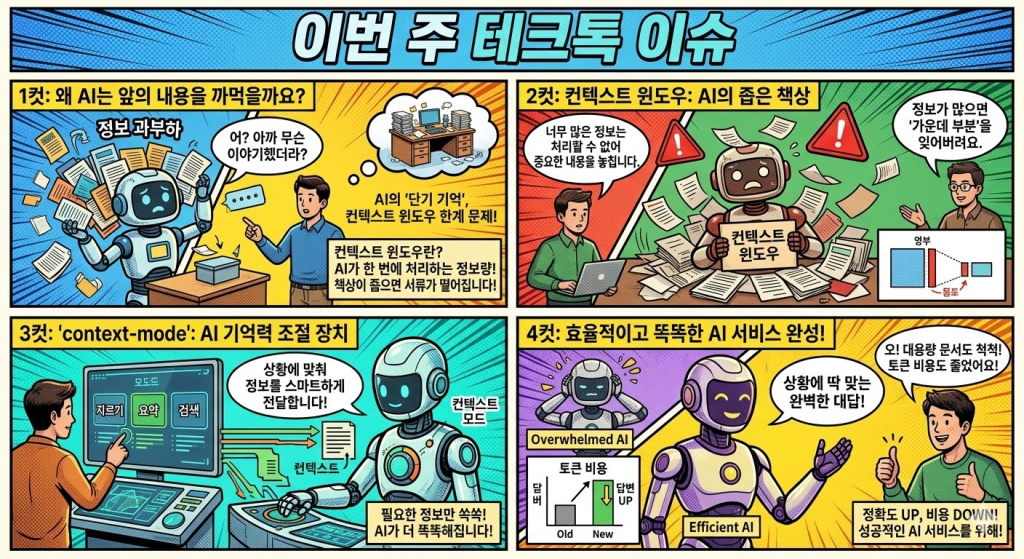
테크톡 독자 여러분, 안녕하세요! AI 시대의 새로운 화두, ‘컨텍스트 모드(Context Mode)’에 대해 이야기해 보려 합니다.
요즘 AI, 특히 거대 언어 모델(LLM)의 활약이 대단하죠? 하지만 AI를 실제 서비스에 적용하려다 보면 큰 장벽에 부딪히곤 합니다. 바로 AI의 ‘기억력’, 즉 컨텍스트 윈도우(Context Window) 한계 때문입니다.
AI에게 긴 문서를 읽게 하거나, 복잡한 대화를 지속하다 보면 앞의 내용을 까먹거나 엉뚱한 대답을 하는 경우가 생깁니다. 모든 정보를 한꺼번에 AI에게 전달하자니 비용도 만만치 않고, 속도도 느려지죠. 그렇다고 정보를 줄이면 정작 필요한 내용을 놓치기 십상입니다.
오늘 소개해 드릴 GitHub 저장소, ‘context-mode’는 바로 이 문제를 아주 영리하게 해결하려는 시도입니다. 복잡한 코딩 없이도 AI의 컨텍스트를 상황에 따라 유연하게 조절하는 ‘모드’를 도입하자는 것이죠.
컨텍스트 윈도우: AI의 짧은 기억력
먼저 핵심 개념부터 짚고 넘어갑시다. AI에게 입력할 수 있는 정보의 총량을 컨텍스트 윈도우라고 합니다. AI는 이 범위 안에서만 정보를 처리하고 대답할 수 있습니다.
비유하자면, 컨텍스트 윈도우는 AI의 ‘단기 기억’, 혹은 ‘책상 크기’와 같습니다. 책상이 좁으면 한 번에 많은 서류를 올려두고 작업할 수 없듯, AI도 컨텍스트 윈도우가 작으면 긴 맥락을 유지하기 어렵습니다.
이 책상 공간을 어떻게 효율적으로 쓸 것인가가 바로 LLM 애플리케이션 개발의 핵심입니다.
‘context-mode’가 제안하는 해결책
‘context-mode’ 저장소는 이 컨텍스트 관리를 상황에 따라 ‘모드’를 전환하는 방식으로 단순화하고 자동화하려는 프레임워크입니다.
개발자가 복잡한 로직을 직접 짜는 대신, 이미 정의된 ‘컨텍스트 모드’를 선택하거나 조합해서 사용하면 됩니다. 주요 특징은 다음과 같습니다.
다양한 컨텍스트 전략 제공: 단순히 정보를 자르는 것(Trunctation)부터, 중요한 내용만 요약(Summarization), 혹은 관련 정보만 검색해서 전달(Retrieval)하는 등 여러 전략을 모드로 제공합니다.
유연한 모드 전환: 사용자의 입력이나 상황에 따라 최적의 컨텍스트 모드로 실시간 전환할 수 있습니다. 예를 들어, 짧은 질문에는 빠른 ‘Trunctation 모드’를, 깊이 있는 분석이 필요할 땐 ‘Summarization 모드’를 쓰는 식이죠.
쉬운 통합: Python 기반의 SDK를 제공하여, 기존 AI 애플리케이션에 손쉽게 통합할 수 있도록 설계되었습니다.
왜 ‘context-mode’에 주목해야 할까요?
AI 서비스를 만들 때 컨텍스트 관리는 필수적이지만 구현하기 매우 까다로운 영역입니다. 이 저장소는 그 복잡도를 낮춰주는 유용한 도구입니다.
토큰 비용 및 성능 최적화: 필요한 정보만 효율적으로 전달하여 토큰 소비를 줄이고(비용 절감), 응답 속도(Latnecy)를 높일 수 있습니다.
답변 정확도 향상: 정보 과부하로 인한 성능 저하(Lost in the middle 현상)를 방지하고, 상황에 맞는 정보를 제공하여 답변의 질을 높입니다.
긴 문서 및 대화 처리: 컨텍스트 윈도우를 넘어서는 방대한 정보도 체계적으로 처리하여, 더 똑똑한 AI 서비스를 만들 수 있게 도와줍니다.
마치며
거대 언어 모델이 발전할수록 역설적으로 이 한정된 컨텍스트 공간을 어떻게 쓸지가 더욱 중요해지고 있습니다. ‘context-mode’는 이 까다로운 문제를 더 쉽고 스마트하게 해결하려는 실용적인 접근법을 제시합니다.
긴 컨텍스트 처리에 고민하고 계신 개발자라면, 혹은 더 효율적인 AI 서비스를 고민 중인 테크 리더라면 이 저장소를 꼭 확인해 보시기 바랍니다. AI가 더 영리하게 우리의 정보를 활용하는 미래, 그 첫걸음이 여기에 있을지도 모릅니다.

