This is a translation of a foreign article, so there may be mistranslations.
https://www.sammobile.com/news/galaxy-phones-display-network-speed-status-bar-how-to/
Network speed display is finally possible on Galaxy phone status bar. Here's how.
Currently, One UI 9 (Android 17) and the Quickstar module of the Good Lock app are required.
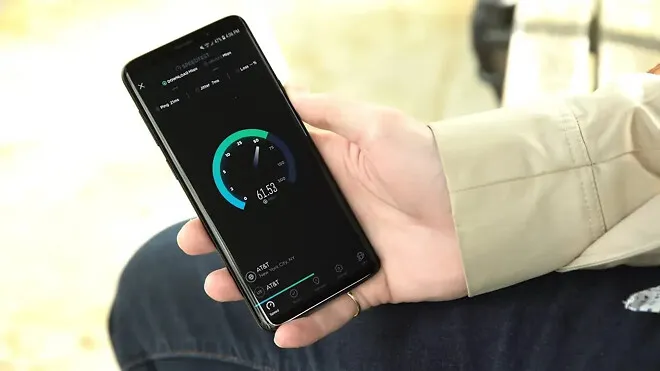
The network speed indicator on the status bar is a feature that Galaxy fans have been requesting from Samsung for years. Since Chinese manufacturers have long offered this feature on their phones, the lack of it on Galaxy devices has always been a bit disappointing.
Until now, there were two ways to check real-time network speed on Galaxy phones. Install a third-party app from the Play Store or enable hidden firmware flags if the device is rooted.
That has finally changed.
Samsung has added a real-time network speed indicator to the status bar through Quickstar, one of the modules of the custom app Good Lock. It's not a true native feature because it exists in Good Lock rather than within One UI settings. However, this is the most official network speed indicator that Galaxy users have been able to have so far.
What the network speed indicator on the status bar shows.
When you turn on this feature, the indicator is positioned on the right side of the status bar and shows real-time download and upload speeds in kilobytes per second or megabytes per second. Our testing showed it to be quite accurate. It works on both Wi-Fi and mobile data, so you can see connection speed regardless of how you're connected.
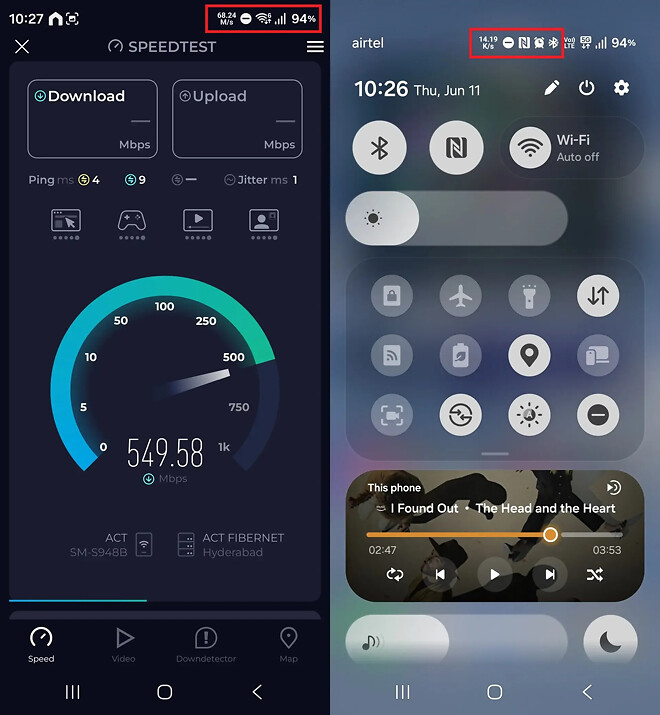
Network speed indicator on status bar – Source Abhijit Mishra / SamMobile.
One thing to keep in mind is that this shows speed, not signal strength. However, there's no need to show signal strength either. The mobile data and Wi-Fi icons on the status bar already tell you the connection strength. The speed indicator is only useful for determining whether downloads stopping or videos buffering is due to connection issues or app problems.
Which phones and One UI versions are supported.
As of the time of writing this article (June 11, 2026), One UI 9 based on Android 17 is required. One UI 9 is currently in beta and is only available on the Galaxy S26 series in 6 countries (Germany, India, Korea, Poland, UK, US).
Eventually, as Samsung releases One UI 9 to more devices, this feature will be available on more Galaxy devices. However, it's unclear whether Samsung will bring this network speed indicator to previous One UI versions or if it will become a native One UI feature at some point.
How to enable the network speed indicator.
Before you start, there's one thing to note. The version of Quickstar that includes this option cannot be downloaded directly from the Galaxy Store at the time of writing, so it must be installed manually. This is normal at this stage. This is because Good Lock and its modules typically don't fully support new One UI versions until or after the official release.
Here's how to set it up.
Verify that your Galaxy S26 is running One UI 9 Beta.
If you don't have Good Lock yet, install it from the Galaxy Store or Play Store.
Depending on when you read this article, you may not be able to access Quickstar through the Good Lock app. If you can't, download Quickstar version 11.0.03.15 to your phone (alternative link) and manually install it using a file manager app like My Files.
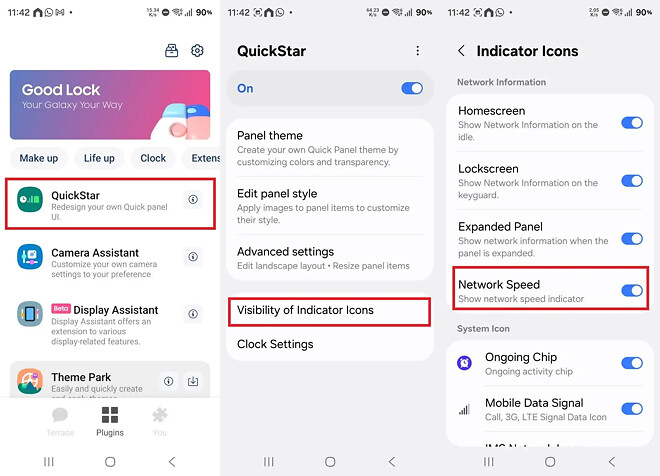
Open Good Lock and open Quickstar in the Plugins section.
Toggle the switch at the top of the screen to turn on Quickstar features, then tap Display Indicator Icons.
Turn on the Network Speed option.
That's it. The network speed indicator will appear on the status bar immediately, and you can disable it at any time from the same menu.