Google Workspace Blog
Troubleshoot formula errors quickly with Gemini in Google Sheets
https://workspaceupdates.googleblog.com/2026/06/troubleshoot-formula-errors-in-sheets.html
Some content was translated from Gemini 3.5 Flash and edited.
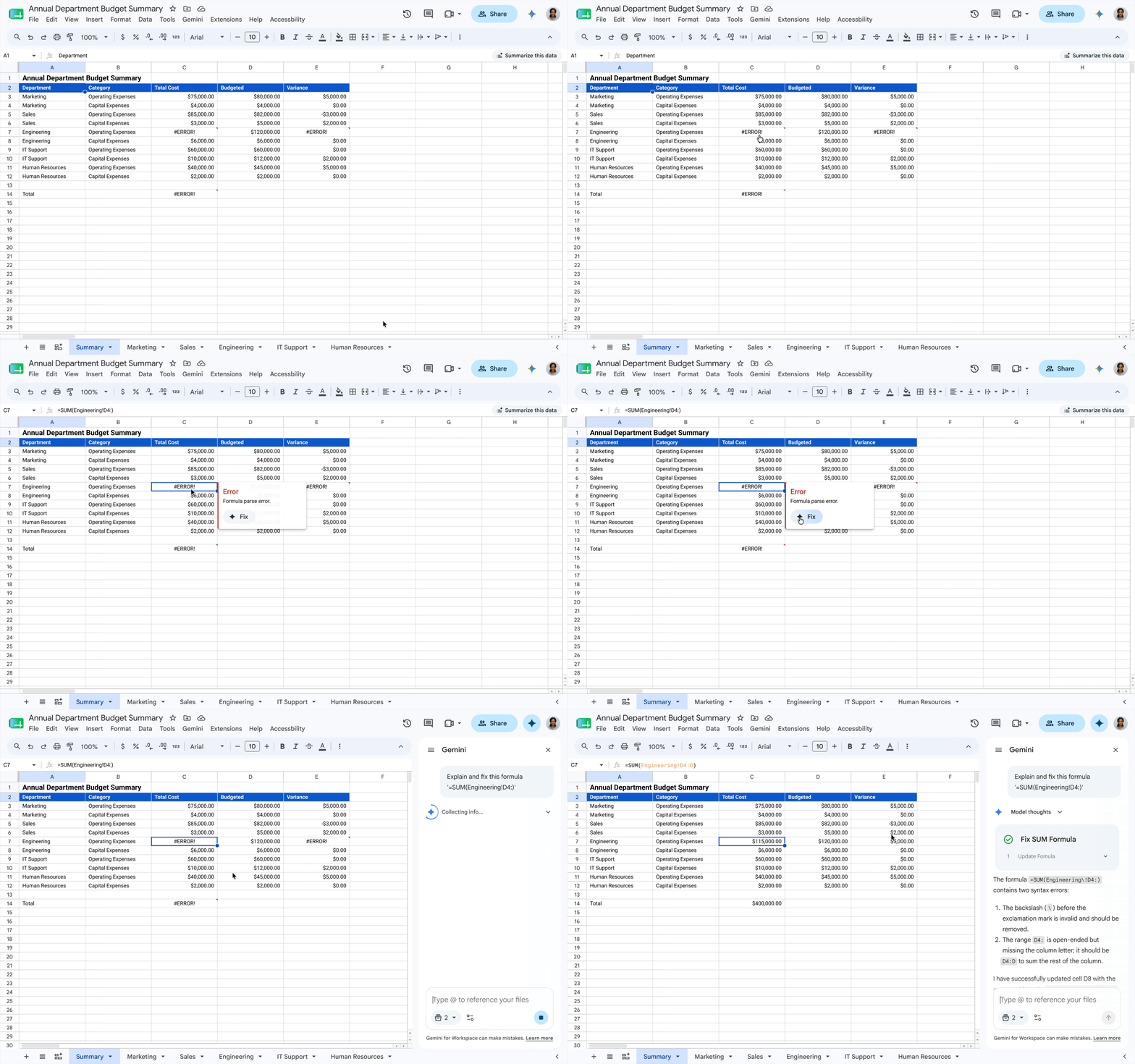
We're excited to introduce a new feature in Sheets called 'Gemini in Sheets' that lets you diagnose and fix formula errors with just one click. When a formula error occurs, Gemini analyzes the surrounding data structure and provides an easy-to-understand explanation of the core issue, along with a revised formula. This feature seamlessly supports everything from basic arithmetic operations to very complex calculations, simplifying the debugging process that was previously cumbersome and time-consuming.
Gemini is built directly into Sheets, removing barriers when performing advanced analysis with complex formulas right in your workflow. This means that everyone from beginners to seasoned data analysts can maintain a continuous workflow without having to individually analyze error messages or search for solutions in external forums.
Note: Workspace customers will receive a promotional benefit allowing them to use the enhanced 'Gemini in Sheets' feature with higher limits until July 15, 2026. This allows users to fully experience the functionality. After July 15th, per-user usage limits will apply, and we will provide detailed information about the updated usage limits through our Help Center before they are implemented.
Supported Editions
Business: Business Standard and Plus
Enterprise: Enterprise Standard and Plus
Individual Users: Google AI Pro and Ultra
Education Add-on: Google AI Pro for Education
Other Add-ons: AI Expanded Access*
After July 15, 2026, users with an AI Expanded Access license will have a higher usage limit for this feature.

