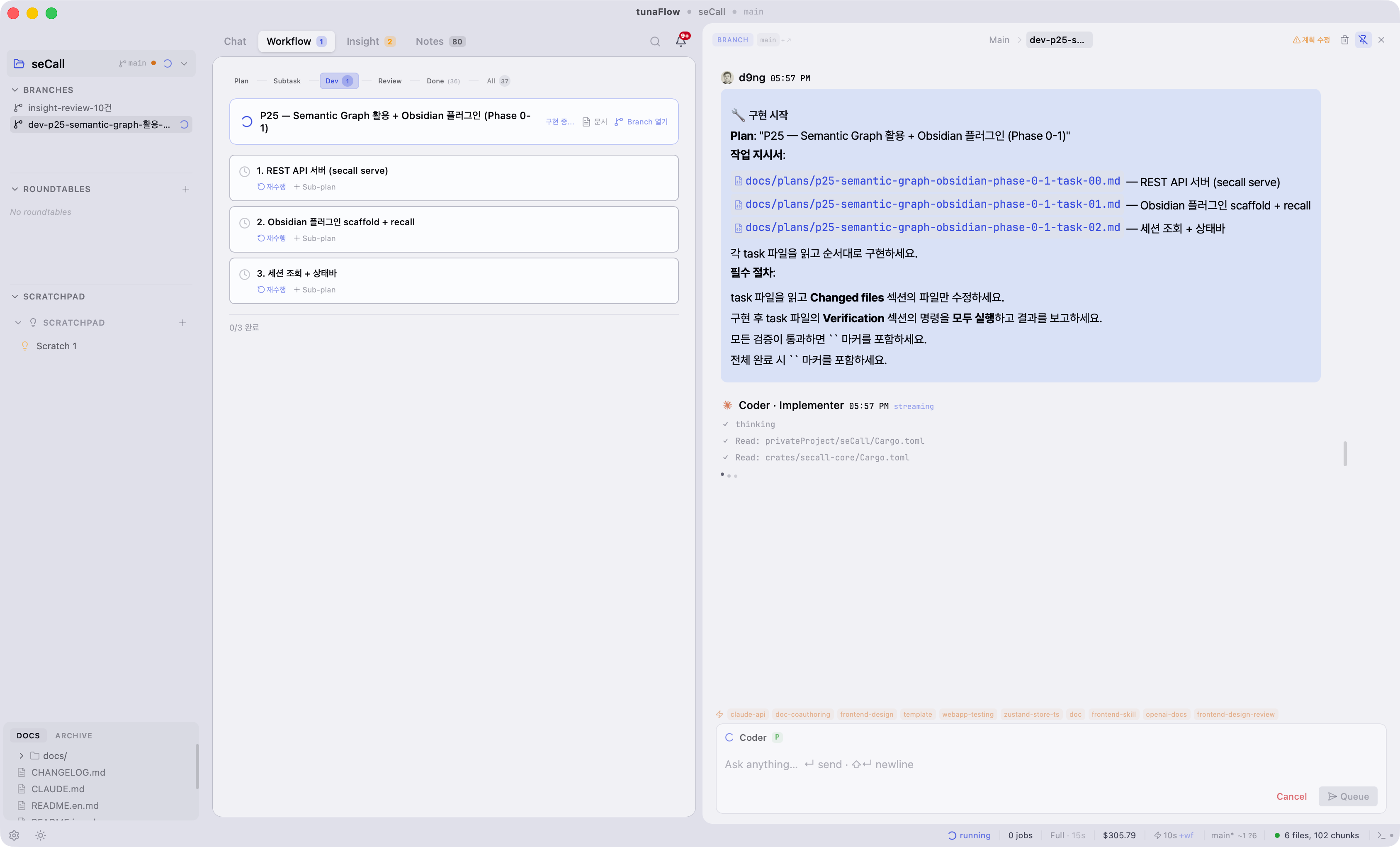
This is part 3 of the tunaFlow technology post series. In part 2, we covered the workflow pipeline (Plan → Dev → Review), and for that pipeline to work, we need a "conversation branching structure." The Implementation (currently Dev) Branch and Review Branch are exactly that. This article discusses the design and usage of Branch itself.
Why do we need to branch conversations?
When conversing with an agent, this situation comes up frequently.
Me: "What if we switch authentication to OAuth2?"
Claude: "Good idea. Here's how to do it..." (long explanation)
Me: "Hmm... but can we also explore keeping JWT?"
Claude: (already in OAuth2 context)
If you try a different direction in the main conversation, the context gets mixed up. To go back saying "the OAuth2 way seemed better," you have to reference previous messages one by one.
But this is more serious with code work. If you have the agent modify code in the main conversation, that change is immediately reflected in the working directory. If you make experimental changes in the main conversation, it's hard to undo.
Just like creating a branch in git to experiment and then merge if it's good, we needed the same structure for conversations.
Basic Branch structure
In tunaFlow, a Branch is an independent conversation branched off at a specific point in the main conversation.
Main conversation:
  msg1 → msg2 → msg3 → msg4 → msg5 → ...
                  ↓
              Branch A (branched from msg3)
                  → branchMsg1 → branchMsg2 → ...
Shadow Conversation
Branch messages are stored in a separate conversation. We call this a shadow conversation.
conversations table:
  id: "conv_main"           ← main conversation
  id: "branch:{branchId}"   ← shadow conversation of Branch
When you open a Branch, it loads messages from the shadow conversation. Since it's a completely separate space from the main conversation, nothing you do in the Branch affects the main conversation. You can even create a Branch within a Branch — we track the tree structure with parent_branch_id. In actual use, it rarely goes beyond 2 levels, but structurally there's no depth limit.
Checkpoint and Context Inheritance
The message at the branching point is called a checkpoint.
pub struct Branch {
    pub id: String,
    pub conversation_id: String,     // parent conversation
    pub checkpoint_id: Option, // branching point message
    pub parent_branch_id: Option,
    pub mode: String,                // "chat" or "roundtable"
    pub git_branch: Option,
    // ...
}
The important part is how Branch inherits context from the parent conversation. This varies depending on the execution mode.
PTY mode (default): Shares the parent conversation's PTY session directly. Since Claude CLI maintains conversation history within the session on its own, when you send the first message to the Branch, the agent already knows the entire context of the parent conversation. No separate context passing is needed.
// threadSlice.ts — Branch shares the parent's PTY session
const ptySession = usePtyStore.getState().getSession(engineKey);
await sendMessageViaPty(set, get, prompt, ptySession, convId, engineKey, {
  forceNewJsonl: isFirstMessage,  // new JSONL path only for first message
});
CLI fallback mode (-p): When PTY can't be used, the ContextPack includes a thread inheritance section. It includes the Thread Anchor (the branching point message) and the last 4 turns of the parent conversation to provide context to the agent.
// context_loading.rs
let thread_inheritance = if is_branch {
    build_thread_inheritance_section(conn, conversation_id)
} else { None };
RT mode: Roundtable participants always run in `-p` mode. Since each participant is an independent subprocess, session sharing is impossible. Instead, RtContextCache assembles minimal context (~1-2k tokens) and per-round transcripts for delivery. RT is covered in detail in part 4.
Three types of Branches
In tunaFlow, Branches are divided into three types based on usage. In the code, they're all in the same branches table but are used differently depending on purpose.
1. General Branch — Free experimentation
A Branch manually created by the user during conversation. Used when thinking "let's try this direction."
Right-click message → "Branch" → New Branch created → Opens in drawer
2. Implementation (Dev) Branch — Auto-created by workflow
Created automatically when a Plan is approved, as covered in part 2.
Plan approved → Implementation Branch auto-created
         → Prompt sent to Developer
         → Implementation completed → impl-complete marker detected
3. Review Branch — Auto-created for review
A Review Branch is auto-created when implementation is completed.
impl-complete detected → Review Branch auto-created
                   → Reviewer agent executed → verdict output
All three types use the same Branch structure. Workflow Branches (2, 3) are connected to the Plan's implementation_branch_id and review_branch_id, so workflow status can be tracked in the Workflow tab.
A structure of layering workflow on top of Branch. Branch itself is a general-purpose conversation split, and workflow adds Phase (implementation/review/rework) and automatic transitions on top. So you can use Branch freely without workflow, and workflow Branches and user Branches are managed with identical structure.
Drawer UX
When you open a Branch, it opens in the right drawer (slider). Not a full screen transition.
┌──────────┬──────────────────┬──────────────────┐
│ Sidebar  │ CenterPanel      │ Branch Drawer    │
│          │ (main chat)      │ (Branch chat)    │
│          │                  │                  │
│          │ msg1             │ branchMsg1       │
│          │ msg2             │ branchMsg2       │
│          │ msg3 ← checkpoint│                  │
│          │ msg4             │                  │
└──────────┴──────────────────┴──────────────────┘
Being able to see the main conversation and Branch side by side is the key. It's common to reference the main conversation's design discussion while implementing in a Branch. With a full screen you'd have to switch back and forth, but the drawer feels like "glancing at the side." Context switching cost is low.
Click the 📌 (pin) button in the drawer to switch to fixed panel mode, split 50:50 with CenterPanel instead of overlay. Useful when you want to keep the implementation Branch visible while reviewing.
Adopt: Merging results into main conversation
When good results come from a Branch, insert a summary into the main conversation. We call this adopt.
Branch reaches conclusion: "OAuth2 PKCE approach is appropriate. Because..."
  → Click Adopt
  → Summary message inserted into main conversation
  → Branch status: active → adopted → moves to Archive
adopt ≠ merge
Unlike git merge, adopt only inserts a summary. All Branch messages aren't copied into the main conversation.
Putting all Branch messages would make the main conversation rapidly longer
Having just the summary leaves "this conclusion was reached" as a fact in the main conversation
If the full content is needed, you can open that Branch from Archive
Summary extraction method
Summary extraction differs between RT Branches and general Branches.
RT: Extracts the Key Positions section from the brief (discussion summary document). RT has a structured discussion format, so relatively clean summaries result.
General Branch: Takes the last 300 characters of the last assistant message. To be honest, this is crude. It's unpretentious. There's also a method to generate summaries using LLM, but we haven't applied it automatically yet. The actual usage pattern is requesting the agent to "summarize the conclusions so far" before adopting.
Git Branch integration
You can connect actual git branches to tunaFlow Branches.
Branch "impl-auth" → git branch "feature/oauth-migration"
When connected, the git branch name appears in the sidebar, and git context is provided when the Developer works in that Branch.
// branches.rs — create_branch
let git_branch: Option = if let Some(ref parent_id) = input.parent_branch_id {
    // inherit git_branch from parent Branch
    conn.query_row(
        "SELECT git_branch FROM branches WHERE id = ?1",
        [parent_id], |row| row.get(0),
    ).ok().flatten()
} else {
    // auto-detect current git branch if no parent
    detect_current_git_branch(project_path)
};
Inherits the parent Branch's git branch, and auto-detects the project's current git branch if there's none. When the agent modifies code in an Implementation Branch, it's reflected in the connected git branch, so you can experiment without polluting the main branch.
Branch management in sidebar
The sidebar shows Branches in three places.
Sidebar:
  ▸ Branches (3)       ← active general Branches
    🔀 impl-auth
    🔀 review-auth
    🔀 experiment-jwt

  ▸ Roundtables (1)    ← active RT (RT = extended mode of Branch)
    👥 auth-discussion

  ▸ Archive            ← adopted/archived Branches
    📦 oauth-analysis
Distinguished by mode field and status field. That RT is an "mode" of Branch is detailed in part 4.
Current limitations
1. Adopt summary is crude
RT does pretty well extracting Key Positions, but general Branches only get the last response truncated to 300 characters. In actual use, we work around this by asking the agent to "summarize the conclusions so far" before adopting.
Improvement direction: At adopt time, having the agent generate a summary of the entire Branch conversation is natural. Since Branch usually has fewer than 10 messages, token cost isn't significant, and we already have LLM summary generation infrastructure in the compressed memory pipeline that we can reuse. We've attached
2. Balance between isolation and sharing
Branch and main conversation are isolated in conversation UI, but not completely. The ContextPack's retrieval pipeline targets all conversations in the project (including Branches) for FTS5 + vector search, so content discussed in a Branch can be pulled into the main conversation's ContextPack as relevant chunks. Code modifications also share the same working directory, so they're immediately visible at the git level.
However, this is indirect transmission via search, so explicit information like "concluded OAuth2 PKCE in Branch" isn't transmitted to main. That's still adopt's role.
Improvement direction: Auto-connection between conversations with session_links table is already implemented, and a cross-session section is included in ContextPack. Auto-generating a session link at adopt time would allow the agent in the main conversation to cross-reference Branch content after adopt. Even before adopt, we're considering putting Branch conclusions as hints into main, but we're approaching carefully to not lose the isolation benefits.
Key decisions summary
Decision | Reason |
|---|
Isolation via shadow conversation | Prevent main conversation pollution. Clean message removal on Branch deletion |
PTY session sharing (general Branch) | Naturally inherit parent conversation context. No separate context passing needed |
Drawer UX (not full screen) | Side-by-side view with main + low context switching cost |
adopt = summary only | Prevent main conversation bloat. Original accessible from Archive |
Workflow borrows from Branch structure | Branch is general-purpose, workflow is a layer on top |
git branch inheritance | Automatically inherit git context from parent Branch |
Next installment preview
Part 4: "Making agents discuss" — Roundtable design and limitations
RT is an extended mode of Branch. When branches.mode = "roundtable", multiple agents discuss sequentially or in parallel. We cover why Review RT is 2-agent, differences between Sequential and Deliberative, and cases where RT doesn't work well.
Series list
Give agents a process — What I learned building AOC
Plan → Dev → Review — Workflow pipeline implementation
Branching conversations — Branch design and usage (this article)
Making agents discuss — Roundtable design and limitations
When conversation gets long — Agent long-term memory implementation
Running workflow with Claude $20 — Engine architecture
Telling agents about code structure — rawq + code-review-graph
Using only necessary skills from 246 — Automatic skill application implementation
When agent repeats same mistakes — Quality assurance design
Running full cycle with tunaFlow — Workflow real-world test retrospective
References

