Small...but a simple tip... I'm sharing this with you.
In the Garmin Forerunner 900 series and above,
the Cycle Dynamics feature is supported,
and through sensors, you can connect speed, cadence, and power meter sensors.
However, the important thing to note when connecting is not to pair the sensor via Bluetooth, but to connect via ANT+
so that you can retrieve detailed data from the power meter and perform detailed analysis.
If you only connect via Bluetooth, you can only analyze "left/right balance" and "power (average/max)".
When you pair the sensor via ANT+,
in the Contax app
in the Charts tab,
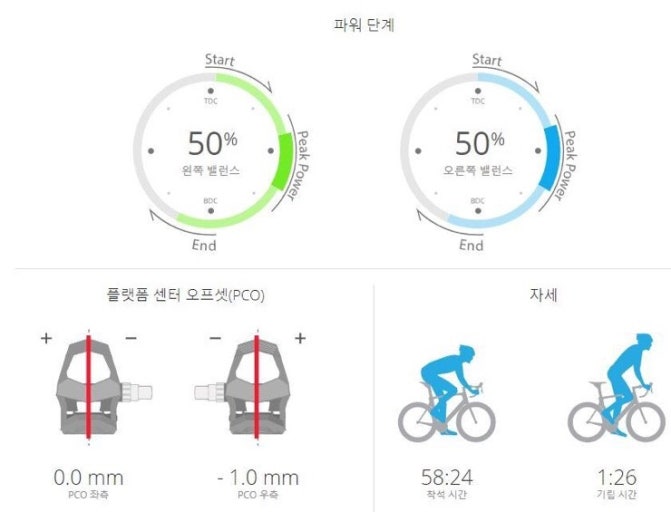
not only "left/right balance" but also detailed data such as "posture", "left/right power phase and balance", "platform offset", etc. are
loaded and detailed analysis becomes possible.
If you're using a Forerunner like me and want to see Garmin data by connecting it with a power meter, please refer to this.
(I've attached images as examples.)
Conclusion: Even without a Garmin speed sensor or Garmin Rally,
you can view detailed data from the power meter through Forerunner watch and external power meter integration!!
Please take note. ^^