https://github.com/DINKIssTyle/DINKIssTyle-VoxCPM2-GUI
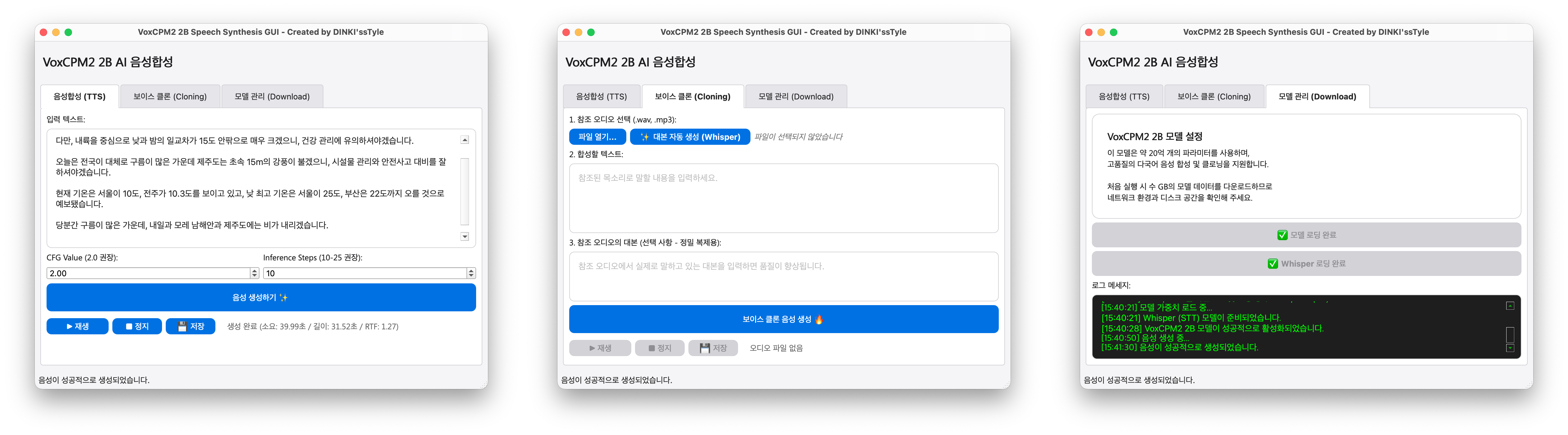
A voice synthesis and voice cloning GUI tool built on PyQt6 and dedicated to the VoxCPM2 2B model. It provides an intuitive interface so anyone can easily use a powerful multilingual TTS model with 2 billion parameters.
✨ Key Features
Speech Synthesis (TTS): Converts input text into high-quality speech.
Voice Cloning: Precisely replicates a voice with just a few seconds of reference audio (WAV, MP3, etc.).
Whisper Integration (STT): Built-in openai-whisper model automatically extracts transcripts from reference audio and maximizes cloning quality (Ultimate Cloning).
Automatic Model Management: Automatically downloads and loads VoxCPM2 and Whisper models into the model/ folder via Hugging Face Hub.
Built-in Audio Player: Listen to generated speech immediately, check processing time and RTF (Real-Time Factor), and save results as .wav files.
What is VoxCPM2
VoxCPM is a Text-to-Speech (TTS) model based on large language models (LLM). It features a multimodal structure that can process text and audio simultaneously, enabling natural pronunciation and intonation.
🚀 Installation and Getting Started
This project recommends using the uv package manager.
1. Package Installation
If uv is installed, you can install all dependencies at once with the following command.
uv sync
2. Running the Program
After environment setup is complete, run the GUI.
uv run voxcpm_gui.py
🛠️ Requirements and Tech Stack
📂 File Structure
voxcpm_gui.py: Main GUI application code
pyproject.toml: Project configuration and dependency list based on uv
model/: Path where downloaded VoxCPM2 and Whisper models are stored (automatically created on execution)
temp/: Repository for temporary library files for audio playback
⚠️ Important Notes
When activating the model, several GB of data will be downloaded, so sufficient disk space and a stable network connection are required.
An NVIDIA GPU environment is recommended for smooth real-time synthesis.
After trying it out, it's not bad.
There's also a demo page, so interested users can listen to it beforehand.
https://openbmb.github.io/voxcpm2-demopage/

