Hello-!
I also jumped on the Vibe Coding bandwagon and made something, so I'm writing this to share it.
URL: https://app.smallpick1.asia
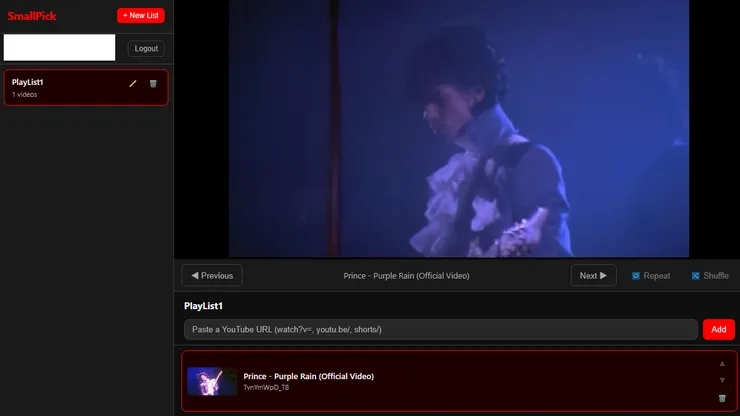
I personally found YouTube's playlist feature a bit inconvenient, so I made this webpage using Vibe Coding.
It was initially for personal use, but I separated it so that users can manage their own lists, added login functionality, and even created a Trend list function - all with Vibe Coding.
You can also play music in the background on mobile devices.
** Additional Information **
Come to think of it, since I made this for my own use, the UI might be a bit unfamiliar to first-time users.
First, create a playlist with the "New List" button.
Then, in the box at the bottom of the video player that says 'Paste a Youtube URL', enter the YouTube video URL and click the "Add" button to add the video.
Manage playlists this way (for example, I have J-pop, Classical, City Pop, M-Flo, etc...)
When you touch or click on a playlist, it will automatically start playing. And when the current video ends, the next video will play automatically.
Thank you!

