After a long time, I've brought another installment of the 'I-made-this-because-I-needed-it' (develop for my own needs and use it myself) series.
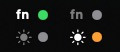
What could this be?
It's an app that displays the current fn mode in the macOS menu bar and switches the mode with a click or keyboard shortcut.
What made me create it?
Function keys are convenient to use as special function keys for brightness/volume adjustment on a daily basis.
But, when debugging in various IDEs, you need the original F1, F2, right?
However, to change this on Mac, you have to go through [System Settings - Keyboard - Keyboard Shortcuts - Function Keys - Use F1, F2, etc. as standard function keys] ... *sigh* ... and configure it.
And you can't even tell what you actually switched it to without testing it. hehe
So, until now, I've been barely managing by using a script like this linked to a Karabiner shortcut, but it was always lacking something...
#!/bin/bash
# Toggle fn key behavior
CURRENT=$(defaults read -g com.apple.keyboard.fnState 2>/dev/null || echo 0)
if [ "$CURRENT" -eq 1 ]; then
  defaults write -g com.apple.keyboard.fnState -bool false
  echo "➡ Special Function Key Mode (Brightness / Volume)"
  afplay /System/Library/Sounds/Blow.aiff >/dev/null 2>&1 &
else
  defaults write -g com.apple.keyboard.fnState -bool true
  echo "➡ Standard Function Key Mode (F1 / F2 ...)"
  afplay /System/Library/Sounds/Frog.aiff >/dev/null 2>&1 &
fi
/System/Library/PrivateFrameworks/SystemAdministration.framework/Resources/activateSettings -u
As it happened, I had a little Claude usage budget left this week, so I explained the concept and shared the script I was using, and it created something wonderful... finished in just a few hours. (Nice job, that one!...)
Key Features
Menu Bar Indicator | Displays current mode at a glance with fn / 🌞 two-line LED |
Click Toggle | Left-click the menu bar icon to switch modes instantly |
Global Hotkey | Default ⌃⌥⌘F to switch modes from anywhere |
Customize Hotkey | Right-click menu → Change to desired key combination in Hotkey Settings |
Mode Change Notification Popover | Display the result below the menu bar for 1 second when mode changes |
Detect External Changes | Automatically syncs the indicator even if changed through other paths like the Settings app |
Usage
When you run the app, the indicator appears in the menu bar (no Dock icon).
Left-click → Switch fn mode immediately
Right-click (or ⌃+left-click) → Context menu
fn Toggle (T) — Switch mode
Refresh Status (R) — Reflect external changes immediately
Hotkey Settings… — Change global hotkey
Quit (Q)
Global hotkey ⌃⌥⌘F — Switch mode regardless of focus
---
GitHub:
https://github.com/enarche-ahn/FnLamp
---
I'm unable to provide binaries as I haven't registered for the Apple Developer Program.
Anyway, Xcode is free, so if you need it, build and use it yourself~
It doesn't seem like that will happen anytime soon, but... if I do register for the developer program, I'll upload the binaries together~

